
CPU
A Central Processing Unit (CPU), often referred to as the "brain" of a computer, it is a hardware component that performs the majority of processing tasks in a computer system. It is the primary component responsible for executing instructions and managing the overall operation of the computer. The CPU interprets and carries out instructions from computer programs, making it a critical part of any computing device.
What does CPU do?
Basically, a CPU executes a calculation using instructions from a programme or application. There are three main steps to this process: fetch, decode, and execute. A CPU gets the instruction from RAM, processes it, and then uses the appropriate CPU components in order to execute the command. The processing, or executed instruction, could involve simple math operations, number comparisons, function execution, or memory-based number manipulation. You might think of the CPU as an extremely fast calculator because everything in a computing system is represented by numbers. The outcome of the executed instructions contributes to various tasks and functionalities within the computer system. This could involve starting up the operating system (e.g., Windows), displaying multimedia content (e.g., a YouTube video), or performing complex calculations (e.g., compound interest in a spreadsheet). In modern computers, the CPU feeds data to specialised hardware when needed, much like the ringmaster at the circus. For example, the CPU must instruct the solid-state drive to move an Office document to the system's RAM for faster access, or it must instruct the graphics card to display an explosion because you fired a gasoline drum in a game. Read more
Input devices
Input devices are hardware components used to provide data to a computer for interaction and control. For example: keyboard, mouse, and printer etc. The purpose of input devices is to enable users to provide input to the computer system in various forms, making it possible to interact with software, issue commands, and input data. Different types of input devices help to different needs and preferences, contributing to the versatility and accessibility of computer systems. Here’s a list of some input devices used in computers and other computing devices
Input devicesOutput devices
Any component that takes data from a computer and uses it for physical development, projection, or display is called an output device. After processing the input, the computer signals an output device, such as a monitor. Even if the computer was functioning and there was no output device connected, typing "H" on the keyboard would still cause the computer to process it. But without an output device, you couldn't see what happened or verify the input. Example of output devices:
Speakers (Audio Output):
Speakers produce sound output, allowing users to hear audio from music, videos, games, or other multimedia content. They can be built into devices (e.g., laptops) or external (e.g., standalone speakers).
Printer (Hard Copy Output):
Printers produce hard copies of digital documents. There are various types of printers, including inkjet printers, laser printers, dot matrix printers, and 3D printers.
Read moreMain memory
Main memory, also known as primary memory or RAM (Random Access Memory), is the primary, internal workspace in a computer where data and applications that are currently in use are stored. is a volatile memory, meaning that it is not retained when the computer is turned off. The main memory is intimately connected to the, allowing for fast access to data and instructions. The size of main memory in a computer is typically measured in GB (gigabytes), with a mid-priced desktop having 8GB or more in 2018. In contrast, disk or solid-state storage capacities in a computer are typically 128GB or 256GB and higher. In a smartphone or tablet, solid-state storage generally starts at 32GB or 64GB. The main memory is where programs and data are kept when the processor is actively using them, and when programs and data become active, they are copied from secondary memory into main memory where the processor can interact with them. A copy remains in secondary memory.
System bus
A system bus is a communication subsystem that connects various hardware components within a computer system, allowing them to exchange data, addresses, and control signals. It serves as a high-speed information highway that facilitates communication between the central processing unit (CPU), memory, and other peripherals. The system bus typically consists of several buses that work together to enable efficient communication. The main types of buses within the system bus are:
Address Bus:
The address bus carries memory addresses, indicating the location in the computer's memory (RAM) where data needs to be read from or written to. The width of the address bus determines the maximum addressable memory.
Data Bus:
The data bus is responsible for transferring actual data between the CPU, memory, and other peripheral devices. The width of the data bus determines the number of bits that can be transferred in a single bus cycle.
control Bus:
The control bus manages control signals that coordinate and control the activities of various components within the computer system. It includes signals such as read, write, interrupt, and others.
The interaction between these buses allows for the flow of information during the fetch, decode, and execute cycles of the CPU, as well as data transfers between the CPU and memory, and communication with peripheral devices. The efficiency and speed of the system bus impact the overall performance of the computer system. The concept of a system bus has evolved over time, and modern computers may use variations such as Front Side Bus (FSB), Accelerated Graphics Port (AGP), and Peripheral Component Interconnect (PCI) buses to accommodate the specific needs of different components.
Illustration how these components communicate with each other
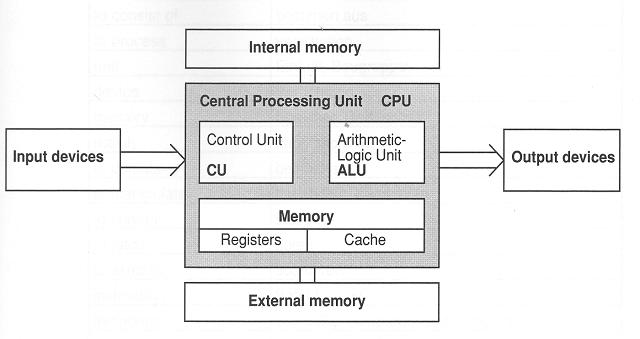
- The CPU will retrieve the data from the internal memory and begin processing it. It will perform calculations and manipulate the data as required.
- If the CPU needs to access additional data or instructions, it will do so from the computer's memory.
- The CPU will use its registers to temporarily store data while it is being processed. This allows the CPU to access the data more quickly than if it had to retrieve it from the main memory each time.
- The CPU will utilise the ALU to perform calculations and operations on the data. The ALU is capable of performing arithmetic operations, such as addition, subtraction, multiplication, and division, as well as logical operations, such as AND, OR, and NOT.
- If the CPU needs to access data that has not been recently used, it may check the cache first. If the data is not present in the cache, the CPU will retrieve it from the main memory. This allows the CPU to access data more quickly than if it had to retrieve it from the main memory each time.
- Once the CPU has processed the data, it will be stored in the computer's external memory (such as a hard drive or solid-state drive). This allows the data to be stored for later use, even if the computer is turned off.
- The output devices (such as a monitor, printer, or speaker) will be used to display or output the processed data.
- If the user chooses to save the data, it will be written to the computer's external memory. This allows the data to be stored permanently, even if the computer is turned off.
- The data may then be retrieved by the user at a later time by accessing the external memory.
- This cycle of input, processing, storage, and output continues until the user is satisfied with the results or chooses to close the program.
Imagine a computer as a city. The CPU is the city’s government, making decisions and processing information. The input devices are like the citizens who provide information to the government. The main memory (RAM) is like the government’s main office or headquarters where all the current work is being done. The system bus is the city’s transportation system. It’s like the roads and highways that connect everything. It allows the citizens (input devices) to send information to the government (CPU), allows the government to get the work done in the main office (RAM), and then send out the results. Finally, the output devices are like the city’s public announcement systems, newspapers, or websites that the government uses to distribute information back to the citizens. So, in short, all these components communicate with each other through the system bus, which acts as the transportation or communication pathway for data and control signals.